Brawlhalla
Features
- Auto-combo:
- Auto attack:
- Unarmed
- Sword
- Spear
- Cannon
- Blasters
- Axe
- Lance
- Katar
- Hammer
- Bow
- Gauntlet
- Boots
- Simulation
- Auto dash
- Auto jump
- Hitchance
- Auto attack:
- Evade:
- Simulation
- Hitbox scale
- Auto dodge
- Auto jump
- Auto dash
- Anti combo
- Visuals:
- Draw hitbox area
- Show damage done
- Misc:
- Auto item pick up
Setup Guide
Follow the setup steps below to get started using this software.
Game Settings
Open brawlhalla and go to settings. Then change your game hotkeys to the one from the image bellow.
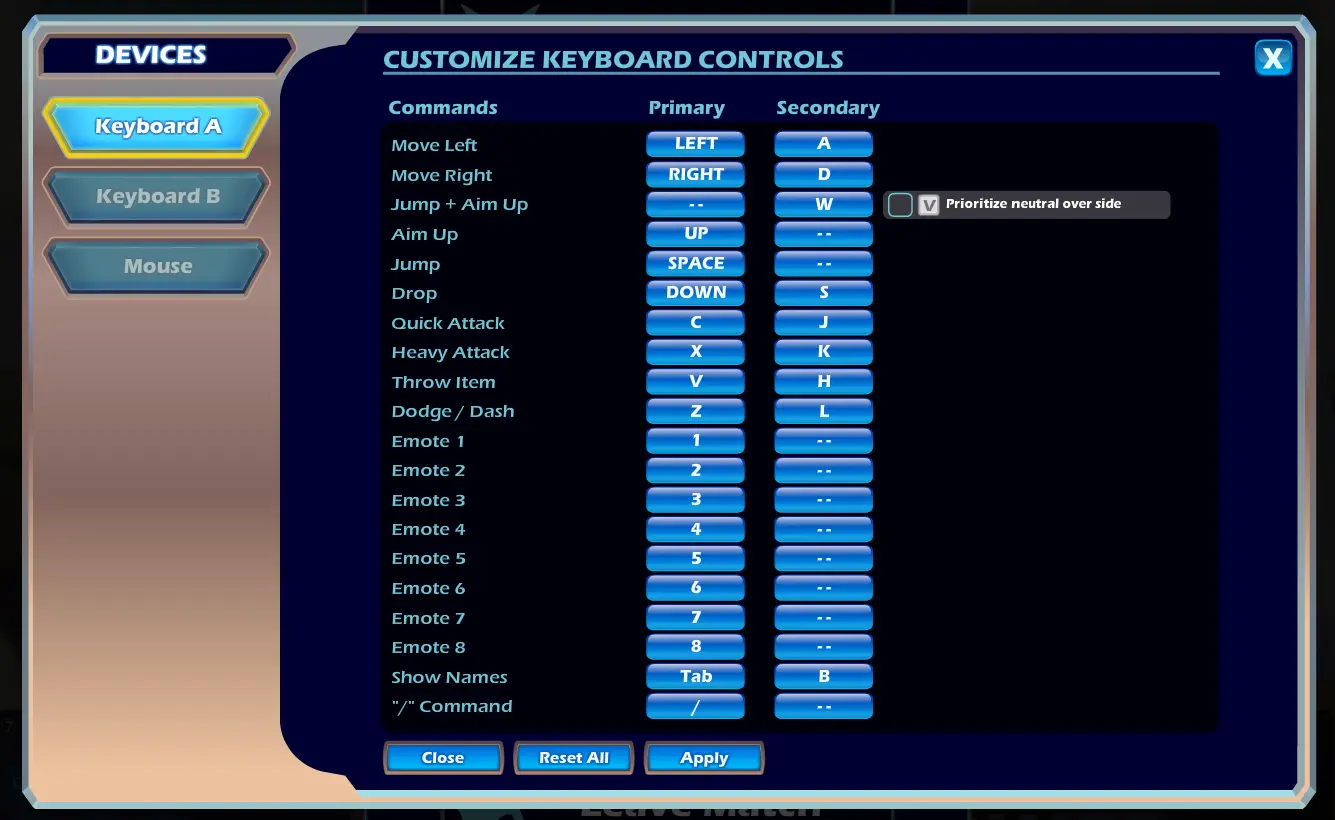
After that, make sure your game is running in fullscreen mode.
DMA
To run this software on your computer, you need an installed DMA board. Connect your DMA board to your secondary PC and start our software from the secondary PC.
KmBox
This software requires an installed KmBox NET board.
Plug your keyboard into KmBox NET.
Please note that the KmBox NET will block some input keys while in game. To unload the cheat make sure you are not currently in an active game.
Using the software
Start the game before you load Seamless Brawlhalla with the loader.
If you encounter any problems, please contact our customer support (opens in a new tab) for further assistance.